Project
A project is the frame you work in. Actors, attributes, network maps, questionnaires and periods always belong to exactly one project and are invisible outside it.
This lets several studies run side by side without interfering: last year's study, the current survey and a test project for trying things out. Use case 2 turns this property into a principle: every school class gets its own project.
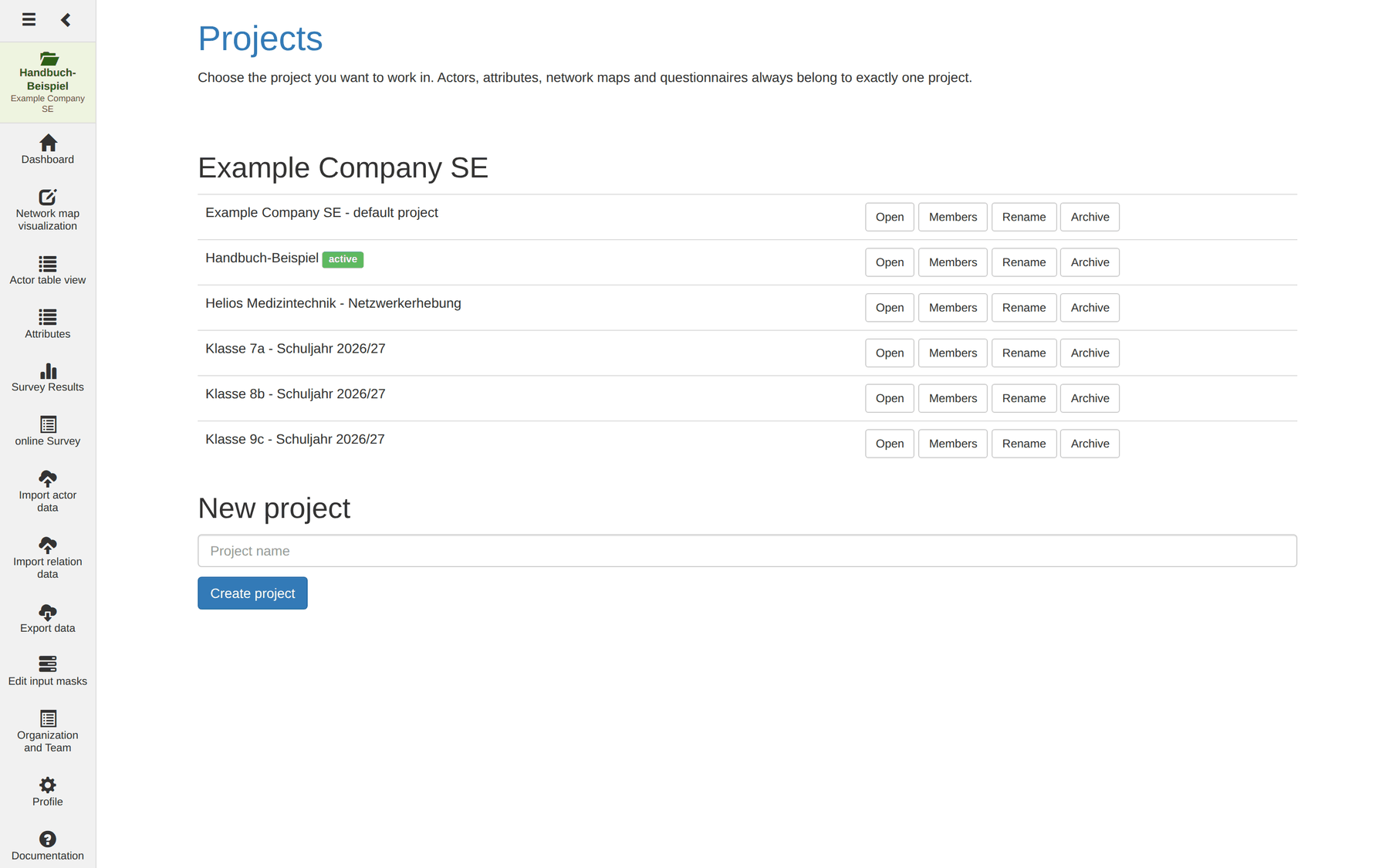
Organisation, project, membership
Three levels interlock:
| Level | Meaning |
|---|---|
| Organisation | Your account or team. It carries the plan and the user accounts; managed in Organisation and team. |
| Project | A body of data inside an organisation. An organisation can hold any number of projects. |
| Membership | Connects an account with a project – together with a role. |
From this follows the most important rule for everyday work: only someone who already has an account in the same organisation can become a member of a project. If somebody is missing from the list, first create a team account in Organisation and team.
What a project separates – and what it does not
Projects are completely separate bodies of data. That also holds for things one easily takes to be global:
- Attributes are project-specific. An attribute
Genderin Class 7a and one in Class 8b are two different attributes, even with the same name and the same values. - Actors exist only in their project. The same real person in two projects is created twice.
- Column and filter settings of the actor table are stored per project.
- Network maps and questionnaires likewise.
Shared are the things at organisation level: user accounts, plan and rights groups.
Tip for several similar projects: set one project up completely – with all attributes and their predefined values – and build the others to the same pattern. Attributes cannot be copied between projects, but the CSV import makes rebuilding quick: the same column structure produces the same result in every project.
The active project
The top of the sidebar shows the project you are working in: folder icon,
project name, organisation below. Very long names are truncated with …; the
full name appears on hover.
Clicking it leads to the Projects module – so the display doubles as the project switcher. If you are in no project, it says no project.
Caution: without an active project the other modules cannot be used. The Projects module, your profile and Organisation and team are the exceptions – they work across projects.
The project list
The module lists your projects grouped by organisation. Each row shows the project name and the available buttons.
| Button | Effect | Who sees it |
|---|---|---|
| Open | Switch to this project | all members |
| Members | Show and hide the member list | all members |
| Rename | Change the project name | the owner only |
| Archive | Take the project off the list | the owner only |
The open project carries the green marker active after its name. If you have no project yet, you see No project yet. Create one to get started.
Switching projects
Open switches to the project and then takes you to the dashboard. From that moment on, every module shows only its data.
Note: nothing is lost when switching. Every project remembers its last opened network map and its last edited questionnaire separately.
Creating a project
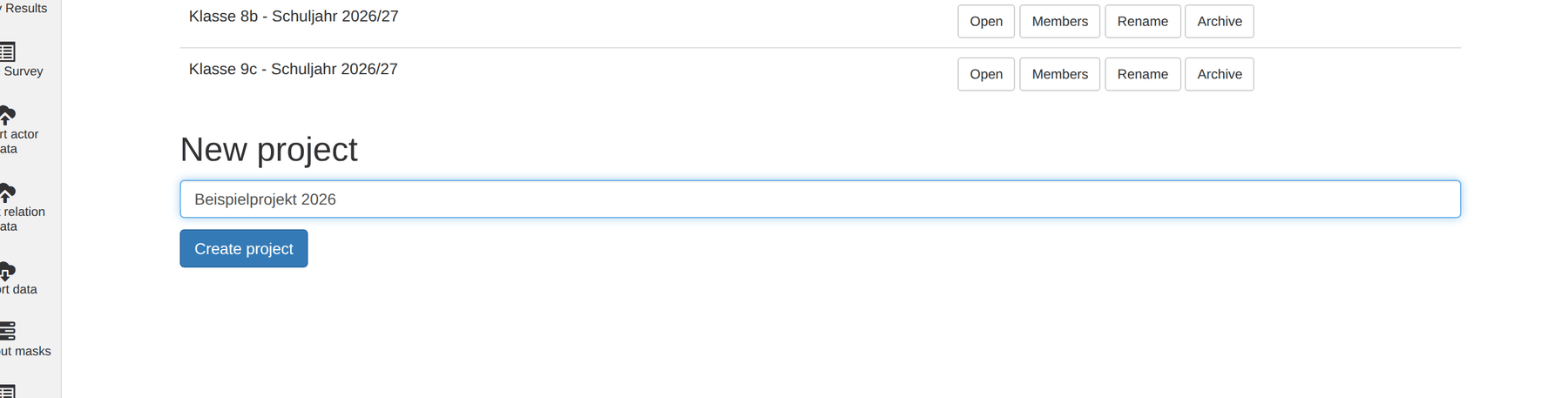
- Enter a project name under New project (up to 255 characters).
- If you belong to several organisations, also choose the organisation.
- Click Create project.
The project opens immediately. If the name field is empty, the module reports Please enter a project name.
A new project is not quite empty: it comes with four technical attributes –
Name, Image, type (actor attributes) and Relation (a relation
attribute). Name is the attribute by which actors are addressed everywhere;
type distinguishes Person, Organization and Other and serves among other
things as the filter for predefined name lists in the
questionnaire.
Naming suggestion: put into the project name what bounds the project – group and period.
Class 7a – school year 2026/27will still make sense in two years' time;New surveywill not.
Renaming and archiving
Rename opens a prompt with the current name and applies the new one immediately.
Archive takes the project off the list after a confirmation: Archive this project? The data is kept, the project disappears from the list.
Important: archiving deletes nothing – actors, attributes, maps and questionnaires remain. The project is simply no longer reachable from the list. If you archive your active project, you then work without one.
Both buttons are available to the owner only.
Members and roles
Members expands the Members of <project> area: one row per person with name, e-mail address, role and – where you are entitled – the buttons to change things.
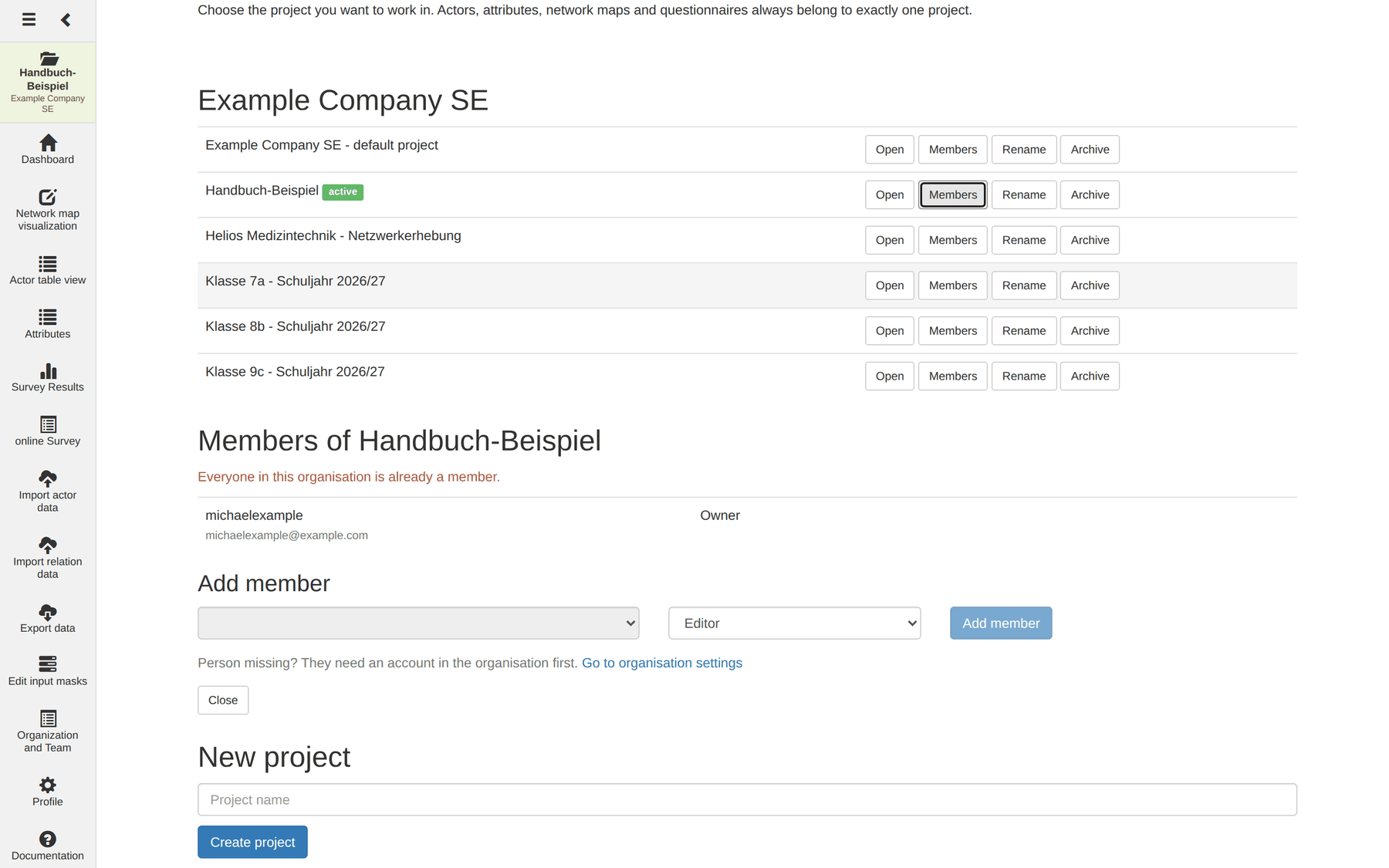
The five roles
| Role | May do, in addition to the role below |
|---|---|
| Read only | View the project and its data |
| Survey | Create and change actors and relations, edit network maps |
| Editor | Maintain attributes and periods, create and publish questionnaires, import and export |
| Administrator | Manage members, rename the project, manage access links |
| Owner | Archive the project and hand over ownership |
The roles build on one another. A project always has exactly one owner.
How this shows up in practice:
- Read only can look at maps, page through the actor table, filter and search – but not change a cell. Moving actors on the map is not possible either; zooming and panning is, because that is looking, not editing.
- Survey can collect data: create actors, draw relations, style maps. Creating new attributes is reserved for Editor, because an attribute changes the structure of the whole project – as does a period.
- Administrator manages the team, not the data. To do both, they also have to be a member with a suitable role.
Note: if the role is insufficient, the module does not carry out the action and reports No permission. The check happens on the server.
Note: for import and export the check happens when the module is opened: without the role you land back in the project list. The other modules open with Read only; there the individual action is checked.
Adding a member
The area appears from the role Administrator upwards.
- Choose the account on the left – the list contains all accounts of the organisation that are not yet members, shown as Name (e-mail address).
- Set the role in the middle. The default is Editor.
- Click Add member.
If all accounts are already members, you see All accounts of this organisation are already members and the button stays disabled.
Note: the selection is deliberately a list and not a field for e-mail addresses. That way nobody from another organisation can be pulled into the project. If a person is missing, the link To organisation management below the form takes you to the right place.
Changing roles, removing members, handing over ownership
Each member row has a role dropdown; a change is saved immediately. Read only, Survey, Editor and Administrator can be assigned. The role Owner is not assigned but handed over.
Remove takes the person out of the project after a confirmation; their account remains.
Make owner is available to the current owner only. After confirmation the owner role moves and you become an administrator.
What MyNetworkmap refuses
| Message | Reason |
|---|---|
| The last owner cannot be removed | A project without an owner would have nobody left to maintain members. |
| The last owner cannot be downgraded | Same reason – hand over ownership first. |
| The new owner must already be a member of the project | Make them a member first, then hand over. |
| The account does not belong to this project's organisation | The person needs an account in the organisation first. |
| The account is already a member of this project | They are already on the list. |
| No permission to maintain members of this project | At least Administrator is required. |
An administrator can neither remove nor downgrade the owner – otherwise any administrator could make themselves the owner.
Organisation administrators
Whoever is marked Admin in Organisation and team receives the management rights in every project of their organisation – without being a member. They can maintain members and rename and archive the project.
They may not edit the project's data. This is deliberate: the inheritance keeps a project reachable when its owner leaves the team – it is not blanket access to every study.
Tip: an organisation administrator who actually wants to work on the data adds themselves as a member with a suitable role. That is one click – and visible to everybody in the member list.
How many projects make sense?
A new project is worthwhile when the group or the point in time changes:
| Situation | Recommendation |
|---|---|
| Several school classes | One project per class – so centrality and density stay comparable per class |
| A second wave for the same group | Either a second project or periods in the same one |
| A partial analysis of one group | No new project – use a second network map or an actor filter |
| One team, several questions | One project, several relation attributes |
Why not put everything in one project? Because measures always refer to what lies on the map. With three classes on one map, density measures the cohesion of three classes taken together – a number nobody wants. Separate projects enforce the clean boundary.